This guide explains what you’re looking at in each part of your Revtrace dashboard — what the numbers mean, how they’re calculated, and how to use them to make better marketing decisions.
What Is Attribution?
Attribution is the process of giving credit to the marketing channel that influenced a sale. When someone buys from your WooCommerce store, Revtrace looks at how they found you — was it a Google search, a Facebook ad, an email campaign, or something else? — and records that as the attributed channel for that order.
Without attribution data, you know how much revenue you made but not which marketing efforts drove it. With it, you can see exactly which channels are worth investing in.
First Touch vs Last Touch
Revtrace records two touchpoints for every order:
First touch — the channel that brought the customer to your store for the very first time. This gets credit for awareness and discovery.
Last touch — the channel the customer came through immediately before placing the order. This gets credit for conversion.
Example: A customer first finds you via a Google search (first touch: organic_search), then three days later clicks your Omnisend email and buys (last touch: email). Revtrace records both.
Neither model is wrong — they answer different questions. First touch tells you what introduces people to your brand. Last touch tells you what closes sales. Most decisions should be informed by last touch because it connects most directly to revenue.
In the Channels report, you can toggle between first touch and last touch using the model selector above the chart.
Channel Labels Explained
Revtrace classifies every session into one of the following channels.
Channel | What it means
`email` | Visitor came via a link in an email campaign. Requires `utm_medium=email` (or `newsletter`) to be set in your email platform.
`paid_search` | Google Ads click — detected via `gclid` (Google’s automatic click ID) or `utm_medium=cpc` with a Google source.
`meta_ads` | Facebook or Instagram ad click — detected via `fbclid` or `utm_medium=cpc` with a Facebook/Instagram source.
`tiktok` | TikTok ad click — detected via `ttclid` or `utm_medium=cpc` with a TikTok source. |
`paid_social` | LinkedIn ads or other paid social — detected via `li_fat_id` or `utm_medium=paid_social` / `utm_medium=cpc` with a LinkedIn source.
`other_paid` | Paid traffic from a source Revtrace doesn’t recognise specifically — usually a UTM-tagged campaign that doesn’t match a known platform.
`organic_search` | Visitor arrived from a Google, Bing, DuckDuckGo, or other search engine result (not an ad).
`organic_social` | Visitor clicked an organic post on Facebook, Instagram, TikTok, Pinterest, Reddit, or similar.
`referral` | Visitor came from another website — a blog, a directory, a partner site, etc.
`direct` | No referrer and no UTM parameters. Typically means someone typed your URL directly, used a bookmark, or arrived from a channel that strips referrers (some apps, PDF links, etc.).
Why does “direct” seem high?
Direct traffic is often partially misattributed. Common causes:
– Email links without UTM tags — clicks from email clients show as direct because email apps do not pass a referrer header
– Social apps — some mobile apps (Instagram, TikTok, Facebook) open links in an in-app browser that strips the referrer
– Shared links — if someone copy-pastes your URL into WhatsApp or Telegram, the click lands as direct
The fix for email is enabling UTM auto-tagging in your email platform (see the [UTM tagging guide](utm-tagging-guide.md)). For social apps, this is partially unavoidable.
Why is there “referral” from my own domain?
This can happen if a customer navigates from one page to another on your site and one of those navigation steps triggers a new session. It’s a known limitation. A future update will let you add your own domain to a filtering list so internal navigation is excluded.
The Overview Report
URL: `/overview`
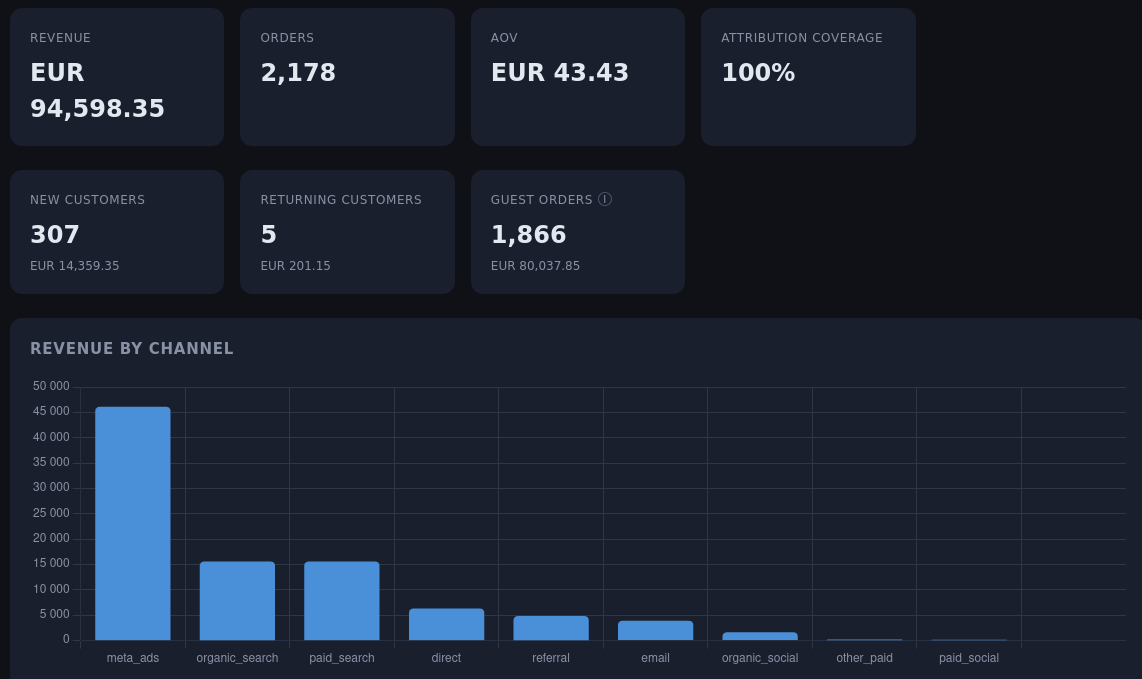
The Overview is your daily summary. It defaults to the last 30 days and shows:
| Metric | What it means |
|——–|—————|
| Revenue | Total order revenue from attributed orders in the date range. Excludes orders with zero revenue. |
| Orders | Total number of attributed orders. |
| AOV | Average order value (Revenue ÷ Orders). |
| Attribution Coverage | Percentage of orders where Revtrace has a session match. If this is below 90%, the plugin may not be tracking all traffic — check your installation. |
| New Customers | Customers placing their first ever order at your store (identified by email). |
| Returning Customers | Customers who have placed an order before (across all time, not just the selected period). |
| Guest Orders | Orders where no billing email was captured — identity cannot be determined. Rare in WooCommerce. |
The Revenue by Channel chart below the stats shows your last-touch channel breakdown for the period at a glance.
Attribution Coverage below 100%
A coverage percentage below 100% does not mean something is broken. Some orders will always be unattributed because:
– The customer disabled JavaScript
– The order was placed via a WooCommerce API (wholesale, headless checkout)
– The plugin was installed after the customer’s session started
Coverage consistently below 80% is worth investigating — check the plugin is active and that your site can reach `app.revtrace.io`.
The Channels Report
URL: `/channels`
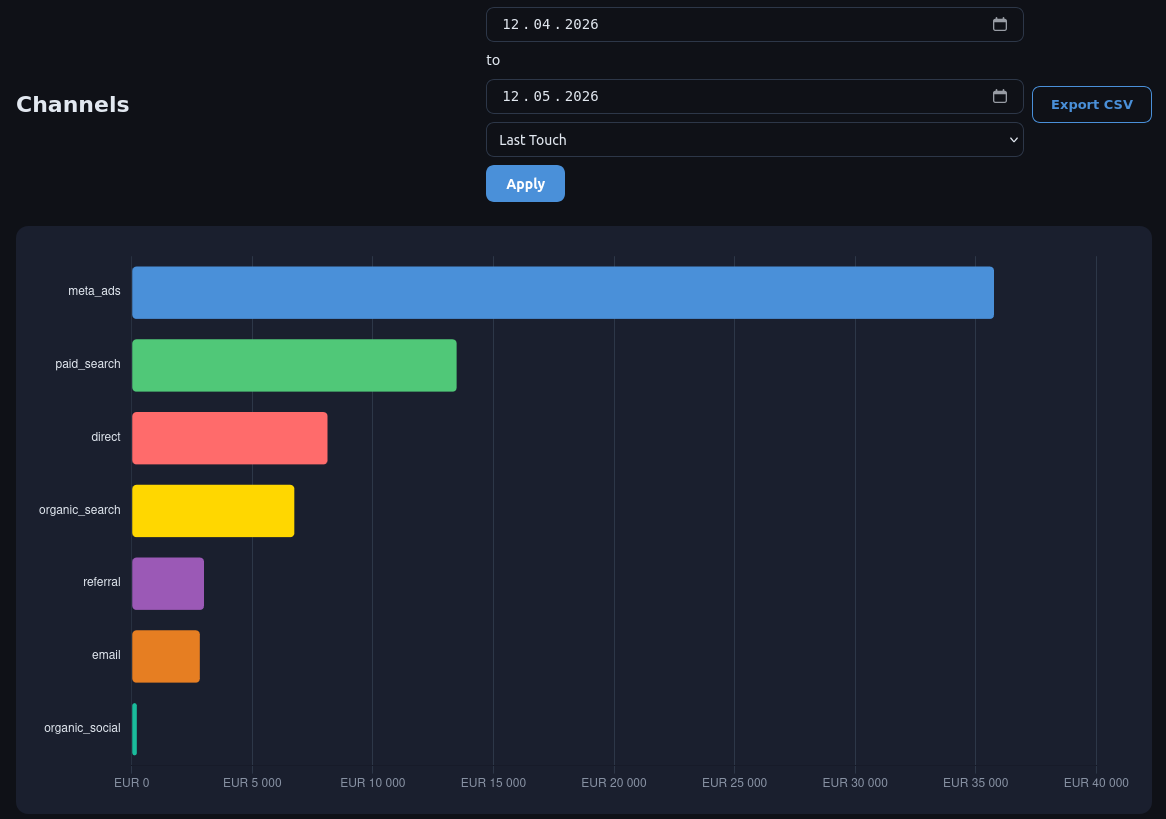
The Channels report shows revenue, order count, revenue share (%), and AOV for each channel.
Toggle between First Touch and Last Touch using the model selector at the top right. The numbers will often look very different — email, for example, tends to show higher revenue on last touch (it closes sales) than on first touch (it rarely introduces new customers).
Export to CSV is available for all date ranges. Useful for sharing with a media buyer or importing into a spreadsheet.
How to use it:
– Compare AOV across channels — some channels attract higher-spending customers even if they drive fewer orders
– Look for channels with strong first-touch numbers but weak last-touch — these are awareness channels that need a closing mechanism (retargeting, email sequence)
– Channels with strong last-touch but weak first-touch are conversion channels — they work but they depend on other channels filling the top of the funnel
The Campaigns Report
URL: `/campaigns`
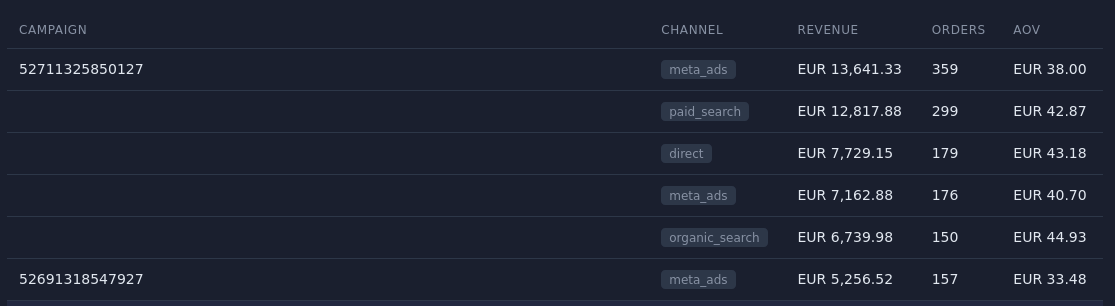
The Campaigns report breaks down revenue by `utm_campaign` value. It only shows orders where a campaign tag was present at last touch. Orders without a `utm_campaign` parameter do not appear here.
Columns: Campaign name, Channel, Revenue, Orders, AOV.
How to use it:
– Compare campaign performance within the same channel (e.g. two Google Ads campaigns head-to-head)
– Identify which specific campaigns, not just which channels, are driving revenue
– High orders + low AOV in a campaign might indicate a discount-driven campaign attracting deal seekers
This report is only as good as your UTM naming. Consistent, descriptive `utm_campaign` values (e.g. `summer_sale_june_2024`) make this report much more useful than vague names like `campaign1`.
The Journeys Report
URL: `/journeys`
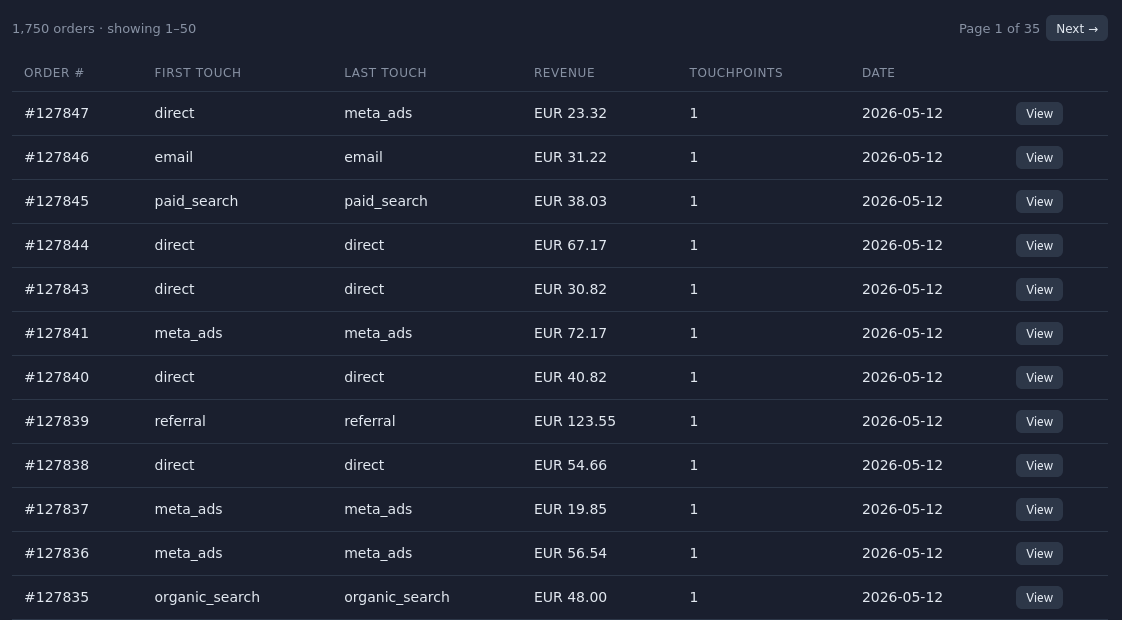
Journeys shows individual orders. For each order you can see:
– First touch channel and source
– Last touch channel and source
– First and last campaign tags
– Revenue
– Number of touchpoints (page visits Revtrace recorded before the order)
– Order date
Export to CSV gives you the full row including all channel and source fields.
How to use it:
– Investigate specific orders where the channel looks unexpected
– Spot patterns — orders with many touchpoints before converting may indicate a long consideration cycle
– Verify that a specific campaign is being attributed correctly
New vs Returning Customers
Revtrace identifies customers by the SHA-256 hash of their lowercase billing email address. This works for both guest checkouts and logged-in customers, across different devices.
New customer — no previous order exists for this email at your store. Returning customer — this email has placed at least one prior order, at any point in time (not limited to the selected date range).
Important limitation: Customers who ordered before you installed the Revtrace plugin will always appear as “new” for their first tracked order, because Revtrace has no history of their earlier purchases. Historical order import is a planned feature that will resolve this.
Why Numbers Differ From Your Ad Platform Dashboards
This is the most common question.
Omnisend / Klaviyo shows more email revenue than Revtrace
Email platforms use a time-window model — if someone clicks any email in the last 7 days and later places an order, the platform claims credit. Revtrace uses session-based last touch — it credits the channel the customer actually came through immediately before ordering. Both are valid, but they measure different things. For budget decisions, session-based attribution is harder to game and closer to reality.
Google Ads shows more conversions than Revtrace
Google uses view-through attribution by default (credits the ad even if the user only saw it, didn’t click). Revtrace only attributes clicks that produced a tracked session.
Meta Ads shows higher ROAS than Revtrace
Meta’s 7-day click / 1-day view attribution window claims credit broadly. Revtrace only counts the click that led directly to the order session.
The takeaway: Revtrace will almost always show lower numbers than individual platform dashboards. That’s not a bug — it’s a more conservative, click-only, session-based view that avoids double-counting.
Quick Reference — Common Questions
Q: An order shows “direct” but I know the customer came from our email campaign.
A: UTM tracking is not enabled in your email platform, or the email link was not tagged. Enable UTM auto-tagging — see the [UTM tagging guide](utm-tagging-guide.md).
Q: Attribution Coverage is 70%. Is that bad?
A: It depends. If you have a lot of phone orders or API-driven orders it’s expected. For a typical WooCommerce store processing standard checkout, anything below 85% is worth investigating.
Q: Why does my Channels report show “other_paid” instead of a specific channel?
A: A UTM-tagged campaign arrived with an unrecognised source. Check that `utm_source` is set to a recognised value (`google`, `facebook`, `instagram`, `tiktok`, `linkedin`) or that the correct `utm_medium` is used.
Q: The Campaigns report is empty.
A: No orders in the date range had a `utm_campaign` parameter at last touch. Start adding `utm_campaign` values to your ad and email URLs.
Q: An order shows a different channel in WooCommerce order meta vs Revtrace.
A: The WooCommerce order meta (`_rt_first_channel`, `_rt_last_channel`) is written by the attribution write-back — it reflects the channel at the time the order was processed. The Revtrace dashboard reflects the same data. If they differ, check the write-back timestamp — it fires within a few seconds of order receipt.