Documentation
-
Frequently Asked Questions
Getting Started What is Revtrace? Revtrace tells WooCommerce store owners exactly which marketing channels are driving their sales — not just traffic, but actual revenue. You’re running Google Ads, Meta campaigns, and email flows. Each platform claims credit for the same sales. RevTrace sits outside all of them and tracks the real customer journey: the…
-
Understanding Your Revtrace Attribution Report
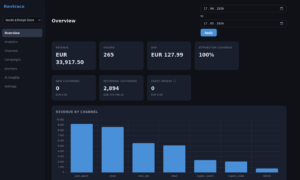
This guide explains what you’re looking at in each part of your Revtrace dashboard — what the numbers mean, how they’re calculated, and how to use them to make better marketing decisions. What Is Attribution? Attribution is the process of giving credit to the marketing channel that influenced a sale. When someone buys from your…
-
UTM Tagging Guide for Revtrace
Revtrace attributes every order to the channel that drove it. For that to work, your traffic sources need to be tagged correctly. Without UTM parameters, email campaigns look like “direct” traffic and some paid ads show up as “referral” — which makes your attribution data misleading. This guide shows you exactly how to tag each…
-
How to Install the Revtrace Plugin on Your WooCommerce Store
Getting accurate attribution data takes about five minutes. This guide walks you through installing the Revtrace plugin on your WordPress site and connecting it to your Revtrace dashboard. Before You Start Make sure you have: – A Revtrace account — start your free 21-day trial if you haven’t already (no credit card required) – WooCommerce…